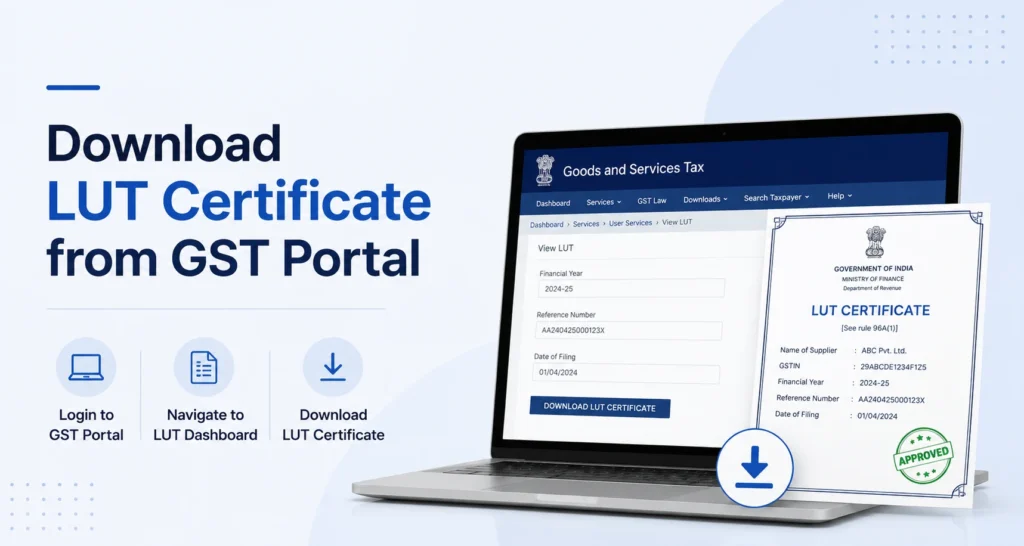
You can download your LUT certificate from the GST portal by going to Services > User Services > View My Submitted LUTs, selecting the relevant filing, and clicking the download link. If you’ve just filed, the acknowledgement is also available immediately on the confirmation screen.
Page Contents
What Is the LUT Certificate, Exactly
Here’s something worth clearing up first, since people search for this document under a few different names. There’s no separate “LUT certificate” that the GST portal issues as a distinct file. What you get is an acknowledgement of your Letter of Undertaking, generated the moment you submit Form GST RFD-11. This acknowledgement carries your Application Reference Number (ARN), and it’s this ARN-stamped document that businesses commonly refer to as the LUT certificate.
So if you’ve been searching for “how to download LUT certificate” and someone else calls it an “LUT acknowledgement,” you’re both after the same PDF.
How to Download LUT Certificate from GST Portal (Step-by-Step)
If your LUT is already filed and you need to pull the document again, here’s the process to download LUT certificate in GST portal.
- Go to the GST portal at www.gst.gov.in and log in with your credentials (username, password, and captcha).
- Navigate to Services > User Services > View My Submitted LUTs. This section lists every LUT application you’ve filed, along with its ARN and current status.
- Select the relevant financial year and search. The list shows the filing date, ARN, and status for each entry, so you can match it against your records.
- Click on the ARN to open it, then click Download to save the acknowledgement PDF.
That’s the full process to download LUT certificate from GST portal for a previously filed LUT.
A quick note on navigation: some guides also point to Services > User Services > View/Download Certificates. This is a separate, broader section that lists all certificates issued by GST tax authorities in one place (registration certificates and other official documents), not just LUTs. For an LUT specifically, View My Submitted LUTs is the more direct route, since that’s where your ARN and acknowledgement live.
Why It Might Not Show Up Immediately
Your submitted LUT goes through a few statuses before the download is final:
- Submitted – right after you file, before anything else happens.
- Pending for Clarification – if a tax officer has queries, you’ll need to respond within 15 working days.
- Pending for Order – once you’ve replied, or if the 15-day window lapses without a reply.
- Approved – accepted by the tax officer.
- Deemed Approved – if the officer doesn’t act within 3 working days, it’s automatically treated as approved.
- Rejected – if the tax officer rejects the undertaking.
- Expired – automatically applied at the end of the financial year it was filed for.
In practice, most LUTs move to Approved or Deemed Approved within a few days, and the acknowledgement is available to download the moment you submit, well before any of this plays out. If your download seems delayed or missing, checking the status against this list is a faster way to understand what’s happening than repeatedly refreshing the portal.
How to Download LUT Acknowledgement Right After Filing
If you’re filing a fresh LUT and want the acknowledgement immediately, you don’t need to go hunting for it separately, the portal hands it to you at the end of the filing process.
- Go to Services > User Services > Furnish Letter of Undertaking (LUT).
- Select the financial year you’re filing for and fill in Form GST RFD-11 (self-declaration checkboxes, witness details, place of filing).
- Submit using either your Digital Signature Certificate (DSC) or Electronic Verification Code (EVC), whichever your business normally uses for GST filings.
- Once submission is successful, the system generates your ARN, and a confirmation message appears on screen with a DOWNLOAD button.
- Click DOWNLOAD to save the acknowledgement to your device right away.
The GST portal also emails and SMSes the ARN to your registered contact details, so you’ll have a record of it even if you close the confirmation screen without downloading.
Why You Might Need to Re-Download It Later
A few common situations where people go back to download LUT from GST portal after the initial filing:
- Shipping or logistics documentation. Freight forwarders, customs brokers, or SEZ authorities often ask for a copy of your current LUT before processing zero-rated shipments.
- Bank or buyer verification. Some banks handling export remittances, or overseas buyers doing compliance checks, want proof that your exports are legitimately zero-rated.
- Internal record-keeping. Finance and accounts teams typically keep a copy on file for audit purposes, separate from whoever originally filed it.
- Lost the original download. If the acknowledgement wasn’t saved properly the first time, the View My Submitted LUTs section is there specifically to let you retrieve it again, as many times as needed.
Things to Check on the Downloaded Certificate
Before you file it away or send it to someone, it’s worth a quick glance to confirm:
- GSTIN matches your business correctly.
- Financial year is the one you intended, LUTs are valid for a single financial year only (1 April to 31 March), not indefinitely.
- ARN and filing date are legible and correct, since this is what any counterparty will use to verify your filing.
- Signatory details reflect the person authorized to sign on behalf of the business.
If any of these look off, it usually points to an error made during filing rather than the download itself, and it’s worth checking with your GST practitioner before using the document externally.
A Quick Note on Timing
An LUT is valid for one financial year only. If you’re an exporter or supplying to SEZ units, a fresh LUT has to be filed and downloaded every year before you make your first zero-rated supply of that financial year, otherwise those transactions default to attracting IGST, which you’d then need to claim back as a refund. There’s no auto-renewal, so this isn’t a one-time download and forget situation.
If Your GSTIN Changed Due to a UT Merger or Split
There’s one edge case worth knowing about if your business is in Ladakh, or in Dadra & Nagar Haveli and Daman & Diu. When these union territories were reorganised, businesses in them were issued new GSTINs. If you’d already filed an LUT under your old GSTIN before the change, that LUT doesn’t carry over automatically. You need to file a fresh LUT against the new GSTIN for the remaining part of that financial year before you can download a valid acknowledgement under it.
Frequently Asked Questions
How do I download the LUT certificate from the GST portal?
Log in to the GST portal, go to Services > User Services > View My Submitted LUTs, select the financial year, and click Download. The document downloads as a PDF.
How do I download LUT acknowledgement from the GST portal after filing?
Right after you submit Form GST RFD-11, a confirmation screen appears with a Download button next to your ARN. Click it to save the acknowledgement immediately. You can also retrieve it later from View My Submitted LUTs.
Is the LUT certificate different from the LUT acknowledgement?
No. There’s no separate document called a “certificate.” The GST portal issues one acknowledgement carrying your ARN, and that’s the document commonly referred to as the LUT certificate.
Can I download my LUT certificate multiple times?
Yes. It’s stored under View My Submitted LUTs for the relevant financial year, and you can download it as many times as you need.
What if I can’t find my submitted LUT under “View My Submitted LUTs”?
Double-check you’re logged in with the correct GSTIN and that you’ve selected the right financial year in the filter. If it’s genuinely missing, the LUT may not have been submitted successfully, in which case you’d need to file it again.
Why does my LUT status show “Pending for Clarification” instead of letting me download?
This means a tax officer has raised a query on your application. You’ll need to respond within 15 working days from the portal. Once resolved, the status moves to Pending for Order and then typically to Approved, after which the acknowledgement is fully available.
I got a new GSTIN after a UT reorganisation (Ladakh, or Dadra & Nagar Haveli and Daman & Diu). Can I still use my old LUT?
No. A new GSTIN requires a fresh LUT filed specifically against it for the remaining part of the financial year. Your previous LUT, filed under the old GSTIN, doesn’t transfer over.
Is there a fee to download the LUT certificate from the GST portal?
No. Filing an LUT and downloading its acknowledgement are both free on the GST portal.
How long is the LUT certificate valid after I download it?
The certificate itself doesn’t expire as a document, but the LUT it represents is valid only for the financial year it was filed for. You’ll need a fresh filing, and a fresh download, for each new financial year.
Do I need a digital signature to download the LUT certificate?
No. A DSC or EVC is required to file and submit the LUT itself. Downloading the acknowledgement afterward, whether immediately or later from View My Submitted LUTs, doesn’t require any further signing.
This article is for informational purposes only and is not investment or tax advice. Consult a qualified professional for decisions specific to your situation.