Page Contents
Introduction
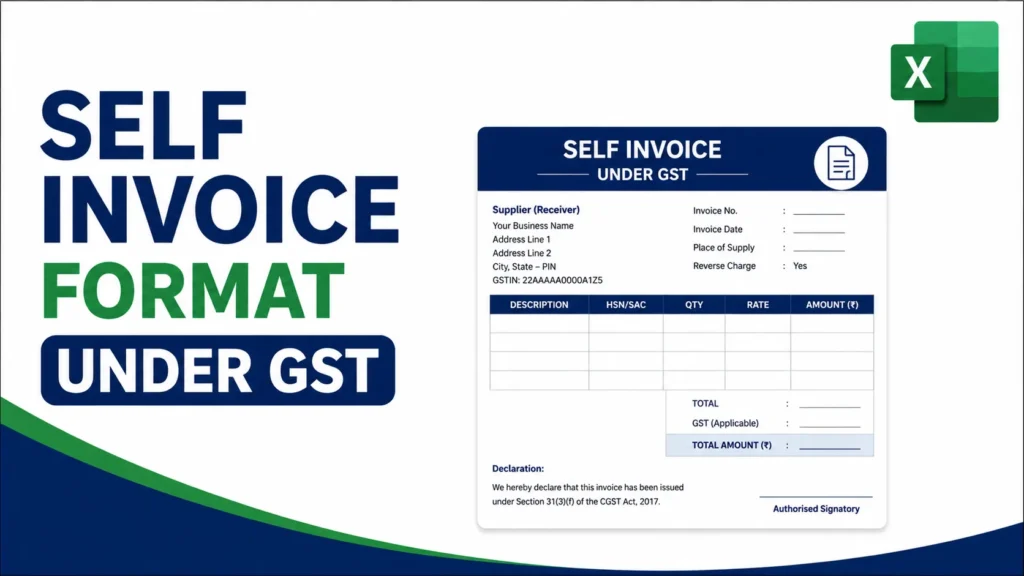
A self invoice under GST is the tax invoice that a registered person must issue to themselves when they receive taxable goods or services from an unregistered supplier and the tax is payable under reverse charge. This requirement comes from Section 31(3)(f) of the CGST Act.
Many businesses search for a self invoice under GST format excel file because they need a simple, reusable layout that captures supplier details, reverse-charge declaration, HSN/SAC codes, tax breakup and totals. This guide explains exactly when self-invoicing is compulsory, the 30-day time limit introduced in 2024, the mandatory fields, common mistakes, and a practical way to maintain the format in Excel so compliance stays easy.
What Is a Self Invoice Under GST
In a normal supply the supplier issues the tax invoice. Under reverse charge the liability to pay tax shifts to the recipient. When the supplier is unregistered and cannot issue a GST-compliant invoice, the registered recipient must prepare the invoice himself. That document is called a self invoice under GST.
Self-invoicing is required mainly in these cases:
- Purchase of goods or services from an unregistered person where reverse charge applies under Section 9(3) or 9(4)
- Import of services (treated as reverse charge under IGST)
- Certain notified categories such as legal services from an unregistered advocate, GTA services from an unregistered transporter, sponsorship, etc.
The self invoice is the primary document that supports payment of tax under reverse charge and the claim of input tax credit on that tax (subject to normal ITC conditions).
Time Limit for Issuing a Self Invoice
From 1 November 2024, Rule 47A requires that a self invoice must be issued within 30 days from the date of receipt of the goods or services from the unregistered supplier.
Before this rule there was no clear timeline, and many businesses issued self invoices only at year-end. The 30-day limit now makes timely compliance mandatory. Missing the deadline can create problems during assessment or ITC verification.
Note: GST rule numbers and effective dates are amended periodically. Confirm Rule 47A and the 1 November 2024 date against the current CGST Rules or a recent CBIC notification before publishing or relying on this for a compliance deadline.
Mandatory Fields in a Self Invoice Format Under GST
A self invoice follows the requirements of Rule 46 (same as a regular tax invoice) with a few practical differences. It should contain:
- Clear title such as “SELF INVOICE” or “TAX INVOICE UNDER REVERSE CHARGE”
- Unique sequential invoice number (maximum 16 characters)
- Date of issue of the self invoice
- Date of receipt of goods or services (helpful for tracking the 30-day limit)
- Name, address and GSTIN of the recipient (you)
- Name and address of the unregistered supplier (GSTIN will normally be blank)
- Description of goods or services
- HSN or SAC code
- Quantity and unit (for goods)
- Taxable value
- Rate and amount of CGST, SGST/UTGST or IGST
- Place of supply
- Explicit declaration that tax is payable under reverse charge
- Signature or digital signature of the authorised person
Many businesses also add a short note: “This is a self invoice issued under Section 31(3)(f) of the CGST Act for supplies received from an unregistered person.”
Self Invoice Under GST Format in Excel: Recommended Layout
You can maintain a clean self invoice under GST format excel sheet with this structure:
Header
- Title: SELF INVOICE (UNDER REVERSE CHARGE)
- Your business name, GSTIN and address on the left
- Invoice number, invoice date and receipt date on the right
Supplier block
- Name and address of the unregistered supplier
- Note that GSTIN is not available
Item table
Suggested columns: Sr. No. | Description | HSN/SAC | Qty | Unit | Rate | Taxable Value | CGST % | CGST Amt | SGST % | SGST Amt | IGST % | IGST Amt
Use simple formulas:
- Taxable Value = Qty × Rate
- Tax amount = Taxable Value × Rate / 100
- Column totals with SUM
Footer
- Tax summary (Total Taxable Value, CGST, SGST, IGST, Grand Total)
- Reverse-charge declaration
- Amount in words
- Authorised signatory
Save the file as an Excel template (.xltx). Each time you need a new self invoice, open the template, fill the details, and save a regular copy with a clear name such as SI-2026-27-018.xlsx.
Free Download: Self Invoice Format in Excel
Download the ready-made template below instead of building the layout from scratch. It already has the recipient, supplier, item table and tax-summary sections described above, with the CGST/SGST/IGST formulas built in.
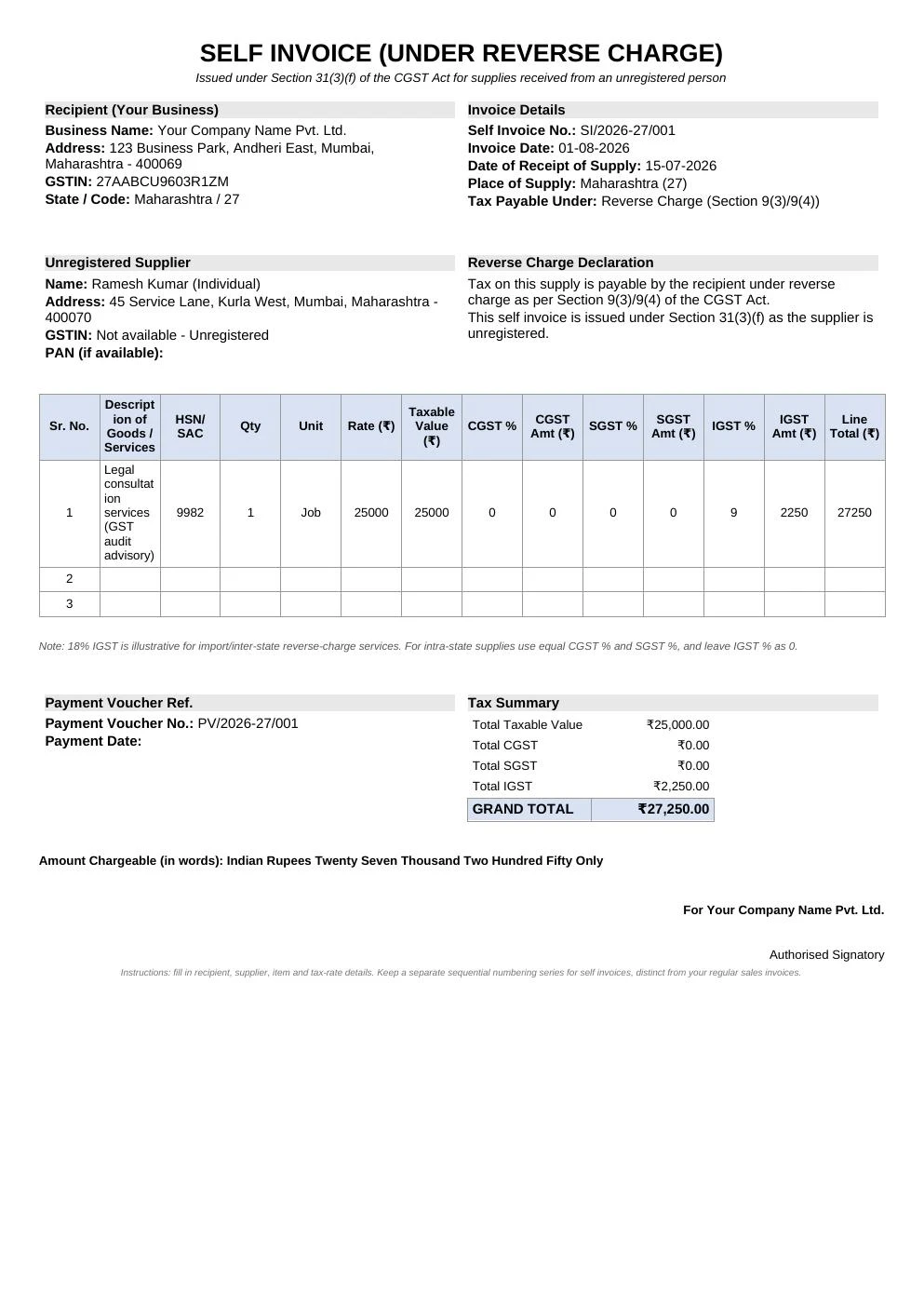
Self Invoice Under GST Format (Reverse Charge)
Ready-made self-invoice template for reverse-charge purchases from unregistered suppliers. Includes recipient and supplier blocks, the reverse-charge declaration, and formula-driven CGST/SGST/IGST calculations.
Yellow cells are inputs — fill in your business details, the unregistered supplier’s details, and the item rows. Taxable value, tax amounts, line totals and the grand total are formulas and update automatically. Keep a separate numbering series for self invoices (for example SI/2026-27/001) rather than mixing them with your regular sales invoice series.
How to Create the Self Invoice in Excel: Step by Step
- Open a blank workbook and set page layout to A4.
- Enter your business name, GSTIN and address at the top.
- Add the title “SELF INVOICE (UNDER REVERSE CHARGE)”.
- Create fields for Invoice Number, Invoice Date and Date of Receipt of Supply.
- Add a Supplier block for the unregistered person’s name and address.
- Build the item table with the columns listed above and insert the formulas.
- Below the table calculate totals using SUM.
- Add a clear reverse-charge declaration and amount in words.
- Protect the formula cells so they are not overwritten by accident.
- Save as a template and keep a separate log of all self-invoice numbers issued.
Keep a distinct number series for self invoices (for example SI/2026-27/001). Do not mix them with your regular outward tax invoice series.
Payment Voucher: The Second Document
Section 31(3)(g) also requires a payment voucher at the time you actually pay the unregistered supplier. The self invoice records the supply and the tax liability. The payment voucher records the actual payment made. Both documents should be preserved for audit purposes.
Common Mistakes to Avoid
- Issuing the self invoice after the 30-day window
- Using the same invoice number series as regular sales invoices
- Forgetting to mention that tax is payable under reverse charge
- Omitting HSN/SAC or taxable value
- Not raising the payment voucher
- Failing to report the transaction correctly in GSTR-3B (tax in Table 3.1(d) and ITC in Table 4A(3))
Practical Tips for Smooth Compliance
Maintain a dedicated folder or Excel sheet only for self invoices. Number them sequentially within the financial year. Cross-check the date of receipt against the invoice date to stay within 30 days. When the same unregistered supplier is used often, keep their details in a small master list for quick copying. Export each finished self invoice as PDF for your records.
Frequently Asked Questions
When is a self invoice under GST required? It is required when a registered person receives taxable goods or services from an unregistered supplier and is liable to pay tax under reverse charge under Section 31(3)(f).
What is the time limit for issuing a self invoice? From 1 November 2024, Rule 47A requires the self invoice to be issued within 30 days from the date of receipt of the goods or services. Confirm this against the current CGST Rules before relying on it for a filing deadline.
Can I use a normal tax invoice template and just change the title? You can start with a normal tax invoice layout, but you must clearly indicate that it is a self invoice under reverse charge, show the unregistered supplier details, and ensure the tax is shown as payable by the recipient.
Is a self invoice needed if the supplier is registered? No. If the supplier is registered and issues a proper tax invoice, the recipient does not issue a self invoice.
Does a self invoice allow me to claim ITC? Yes, subject to the normal conditions for claiming input tax credit on reverse-charge supplies. The self invoice is the primary supporting document.
Should self invoices be reported in GSTR-1? Self invoices themselves are not reported as outward supplies in GSTR-1. The tax paid under RCM is shown in GSTR-3B and the corresponding ITC is claimed in the same return.
Conclusion
A clear self invoice under GST format excel sheet helps registered businesses stay compliant when dealing with unregistered suppliers under reverse charge. Focus on timely issuance within 30 days, a distinct invoice number series, complete supplier and item details, correct tax breakup, and an explicit reverse-charge declaration. Once the Excel template is set up with proper formulas, raising each new self invoice becomes a quick and controlled process. Keep the records organised and report the transactions correctly in GSTR-3B so both tax payment and ITC claims remain clean.